Fan Noise for Sleeping - App
- 3.3
- Rating
- 10.00K
- Installs
- Free
- Price

 Analysis by App-foxy
I tested Fan Noise for Sleeping as a simple medical-category sound app, and its appeal became clear almost immediately: it is designed to put a steady layer of sound between you and the small noises that make sleep harder. A fan, distant traffic, voices in another room, or an unpredictable household can all interrupt the quiet. This app takes the opposite approach from music or spoken sleep content. It gives you a consistent background instead of something that demands attention.
That makes it especially interesting for shared homes. I can imagine using it on a bedside phone while another person is still reading, while a child is settling down, or while someone in the next room is moving around. The experience is not luxurious or packed with distractions. It is focused on one job: producing fan-like noise and nature sounds for rest. Whether it becomes a useful nightly tool depends on how much control you want and how well a plain sound layer fits your routine.
How it fits into a shared household
In my experience, the strongest use case is not “I need an impressive sound library.” It is “I need a predictable sound that helps make an imperfect room easier to sleep in.” That distinction matters. A person who lives alone in a quiet bedroom may barely need an app like this. Someone sharing a room, living near a busy street, or trying to sleep at a different time from the rest of the household may find it much more practical.
You May Also Like

 Pandora - Music & Podcasts
Pandora’s Music Is Easy to Start, but Harder to Recover
Pandora’s strength is its low-effort path from a seed to a station. Its weak spot is how much confidence it asks you to place in connection, setup, and quiet recovery.

 AccuWeather: Weather Radar
AccuWeather Review: A Quick, Clear Forecast for Everyday Decisions
For everyday plans, the best forecast is the one you can understand quickly. AccuWeather makes rain timing, radar, and local conditions easy to act on, with a few trade-offs.

 Hill Climb Racing
Why Hill Climb Racing Still Turns Crashes Into One More Run
A tiny car, a bumpy hill and one more upgrade: Hill Climb Racing keeps resurfacing because its simple chaos makes every near-miss feel personal.

 AliExpress - Shopping App
AliExpress Makes Global Shopping Feel Personal, but Shoppers Bear the Risk
AliExpress turns a global marketplace into a pocket-sized discovery engine. Its reach is useful, its shopping loop compelling, and its trade-offs easy to miss.

 Lords Mobile: Kingdom Wars
Lords Mobile Is a Kingdom-Building Routine, Not a Quick Match
A case-by-case verdict on the building, battles, device demands, and social commitments that make Lords Mobile rewarding for some players and exhausting for others.

 PDF Scanner app - TapScanner
TapScanner Makes Paperwork Easier to Capture, Check, and Share
TapScanner makes scanning with a phone feel less like a rescue operation and more like a dependable step in getting work done. Its capture tools are useful, though not flawless.
More From Our News Desk
View All News


A realistic example is a couple with different schedules. One person goes to bed earlier, while the other is still preparing for the next day. Fan Noise for Sleeping can sit on the bedside device and soften the sound of drawers, footsteps, and quiet conversation. It does not solve the underlying scheduling problem, but it can reduce the sharpness of those interruptions without requiring the later sleeper to remain completely silent.
The same idea works for a parent sharing a room with a young child, although I would treat the app as an aid rather than a solution to every sleep problem. A steady sound can make a room feel less exposed to sudden household noises. It may also help an adult maintain a familiar bedtime environment when sleeping somewhere other than the usual bedroom. Still, I would keep the device positioned safely and avoid placing it directly beside a child’s head or using high volume.
For a household device, the main advantage is simplicity. There is no need to create a playlist, choose songs, or keep changing tracks when one becomes irritating. The short description identifies the experience as fan noise, while the broader purpose includes nature sounds. That gives the app a more restful direction than a general music player, but it also means people looking for podcasts, meditation lessons, or guided breathing will need another tool.
What the first setup tells you
The app is free to install, which makes trying it in a real bedroom fairly easy. It is suitable for Everyone, and it runs on Android devices using version 7.0 or later. Those details make it approachable for an older spare phone or a shared household device, provided that device meets the operating-system requirement. The current version is 1.0.8, so I would still check that the phone behaves normally after installation rather than assuming every older handset will offer the same experience.
My advice is to decide in advance which device should host the sound. Using a personal phone can be convenient, but it may also create friction when the owner needs the phone for alarms, messages, charging, or travel. A spare phone can be a better household solution because it turns the sound source into a dedicated bedside object. That is not a special feature of the app; it is simply a more reliable way to avoid mixing sleep with everyday phone use.
There is also a practical boundary around expectations. This is a sound app, not a medical treatment. The Medical category may make it look more clinical than it feels in use, but the actual experience is closer to a focused sleep aid. If persistent insomnia, anxiety, breathing problems, or severe daytime tiredness is involved, I would not use background noise as a substitute for professional advice.
Before settling on a sound, I would test it during a short quiet period rather than waiting until the moment everyone is trying to sleep. Some people prefer a low, even fan texture because it masks interruptions without drawing attention. Others find nature sounds more pleasant but less effective at covering sudden household noise. The best choice is not necessarily the most relaxing sound in isolation; it is the one that remains comfortable after several minutes and does not make you listen for changes.
Boundaries matter more than extra sound choices
Shared-device use brings a question that is easy to overlook: who is allowed to change the sound? If one person wants rain-like ambience and another needs a steady fan texture, the household should agree on a default before bedtime. Otherwise, the app can become another small source of negotiation. I would choose one setting for the room, keep the volume conservative, and avoid turning the phone into a late-night browsing device.
This is one of the less obvious trade-offs with a simple sleep app. A larger sound library may seem better, but too many choices can encourage experimentation when the goal is to wind down. Fan Noise for Sleeping is more appealing when treated as part of a fixed routine: open it, select the sound that works, place the device safely, and stop interacting with the screen.
The free entry point is helpful, but in-app purchases range from $2.99 to $29.99 per item. I would pay attention to the purchase screen before committing to anything, especially on a shared device. A free installation does not mean every available sound or option is necessarily included without charge. If several people use the same phone, agreeing on purchases beforehand avoids an awkward surprise and keeps the app within the household’s intended budget.
I would also separate the app from the phone’s other responsibilities. If the device is the only alarm clock, test the alarm and sound behavior together. If it is used for emergency calls, keep it accessible and charged. If a child may reach it, remember that the Everyone rating describes the app’s age suitability, not a guarantee that a phone can be left unattended in every situation. Good household boundaries still matter.
Coordinating sleep without making the app do too much
Fan Noise for Sleeping works best when everyone understands what it is supposed to accomplish. It can cover or soften background noise, but it cannot coordinate bedtime schedules, settle disagreements about room temperature, or replace a conversation about quiet hours. I would introduce it as one part of a shared plan: decide when the room becomes quiet, choose the sound, set a comfortable level, and leave the phone alone.
That approach is particularly useful when adults and children share a space. A child may associate the sound with bedtime, while the adult benefits from a more stable acoustic environment. However, I would not assume that every child will find fan noise soothing. Some may prefer silence, and others may become focused on the sound itself. A short daytime trial gives the household a chance to notice that reaction without turning bedtime into an experiment.
For partners, coordination can be even simpler. One person can use the app while the other uses headphones for a separate activity, but the app’s main strength is room-level sound rather than private listening. If the other person dislikes any background audio, a personal alternative may be more considerate. In that situation, a sleep app with headphone-focused content or a physical fan might be a better fit than sharing one speaker in the room.
I would also avoid changing sounds repeatedly in response to every small disturbance. That usually makes the phone more noticeable, not less. A useful workflow is to select the sound before getting into bed, listen at a modest level, and give it time to become part of the room. If it still feels intrusive, the answer may be a different type of sound or no sound at all—not simply a louder setting.
Age, trust, and responsible use
The Everyone content rating makes the app broadly suitable from an age-classification perspective, which is reassuring for a household where more than one person may handle the device. Still, I would keep expectations realistic. An age rating does not tell you whether a particular child will sleep better with the app, nor does it replace adult supervision of purchases, device placement, or nighttime phone access.
Trust is also relevant because a shared device can contain more than this app. If a child uses the phone to start the bedtime sound, an adult may want to set the routine together and make clear that the device is for the agreed purpose. I would not describe this as a parental-control solution. The app’s value is the sound itself, while household rules have to provide the boundaries around it.
The developer is Geastorm, and the app has reached over 10K installs with an average rating of 3.3 from around 102 ratings and 33 reviews. I read that overall reception as mixed rather than alarming: enough people have tried it to make it a credible option, but the rating suggests that it will not suit everyone equally. That matches the nature of sleep sounds. Personal response, phone speaker quality, room acoustics, and tolerance for repetition can all change the result.
Because the app is relatively focused, I would not choose it for a household that wants a full wellness platform. There are better alternatives for guided meditation, sleep stories, breathing exercises, or detailed habit tracking. A real fan may also be preferable if the household wants airflow as well as sound. On the other hand, a physical fan can be noisy in its own way, consume more electricity, and be inconvenient when traveling. This app is strongest when portability and quick access matter more than physical airflow.
Where it beats familiar alternatives—and where it does not
Compared with a music streaming service, Fan Noise for Sleeping has a clearer purpose. Music introduces melodies, changes, and emotional associations that may keep some listeners alert. A steady fan-like texture is less demanding. Compared with a generic soundboard, the app’s identity is more specific: it is aimed at sleep rather than at every possible ambient effect.
That specialization is useful, but it can also feel limited. A streaming service may offer more variety, better discovery, and easier access to long-form audio. A dedicated physical fan may feel more natural and may provide cooling. A sleep app with a timer, mixing controls, or personalized routines could offer more flexibility. I would choose this app when I want a straightforward sound layer, not when I want a complete sleep-management system.
There is a financial trade-off as well. The app can be tried without an upfront price, while optional in-app items cost between $2.99 and $29.99 each. That makes it sensible to test the basic experience first. If the free selection already solves the household’s problem, there is no reason to buy more. If the available sound does not work, paying for additional content may not fix the deeper issue that the person simply dislikes app-based noise.
One practical tip is to judge the sound from the actual sleeping position, not from arm’s length. A tone that seems gentle while holding the phone can become tiring when played beside a pillow for hours. I would place the device across the room if it still masks the relevant noise, which also reduces the temptation to check the screen. If the sound disappears at that distance, a small speaker or a physical fan may be a more suitable alternative.
Another useful test is to compare predictable noise with changing noise on separate nights. If sudden events are the main problem, the fan-like option may be more effective than nature audio with noticeable variation. If the room is already noisy and the person finds fan textures harsh, a softer nature sound may be more comfortable. The right choice depends on whether the priority is masking, relaxation, or simply creating a familiar bedtime cue.
My household verdict
I see Fan Noise for Sleeping as a modest, practical app rather than a complete answer to sleep difficulties. Its best role is in a shared household where small noises regularly disturb someone, a physical fan is inconvenient, and nobody wants music or spoken content at bedtime. The free installation lowers the risk of trying it, and the Everyone rating makes it easy to consider for a family device, as long as adults still manage device use and purchases.
I would recommend it to a person who wants a steady background sound, travels with an Android phone, or needs a low-effort way to make an uneven household quieter. I would be more cautious for someone who expects advanced scheduling, personalized sleep analysis, therapeutic guidance, or extensive control over every aspect of playback. Those needs point toward a different category of app or a non-app solution.
The average rating of 3.3 is a fair reminder to keep expectations grounded. This is not an app I would install and assume will transform sleep overnight. I would test it at a low volume, use it consistently for a few nights, and ask whether it genuinely reduces interruptions or merely adds another sound to notice. If it helps, its simplicity becomes a strength. If it does not, there is little value in forcing it into the routine.
My final view is that Fan Noise for Sleeping is most useful when treated as shared-room sound management, not as a medical cure or a feature-heavy wellness platform. Geastorm has kept the central idea easy to understand: choose a suitable background and let the room feel more predictable. For the right sleeper, that is enough. For everyone else, a real fan, headphones, silence, or a richer sleep app may be the better answer.
FAQs for Fan Noise for Sleeping - App
01What is Fan Noise for Sleeping used for?
Fan Noise for Sleeping is designed to play steady fan sounds that can help create a calmer bedtime environment. The continuous background noise may mask traffic, conversations, household sounds, or sudden disturbances that make it difficult to relax. It can also be useful while studying, meditating, traveling, or working when you want a consistent audio atmosphere rather than complete silence.
02Does Fan Noise for Sleeping work without an internet connection?
In most cases, the app can be used offline once its available sounds have been loaded on the device. This is convenient for bedtime, flights, hotels, or places with unreliable Wi-Fi. However, certain features, advertisements, updates, or additional sound content may require an internet connection. It is best to open the app and test the selected sound before relying on it offline.
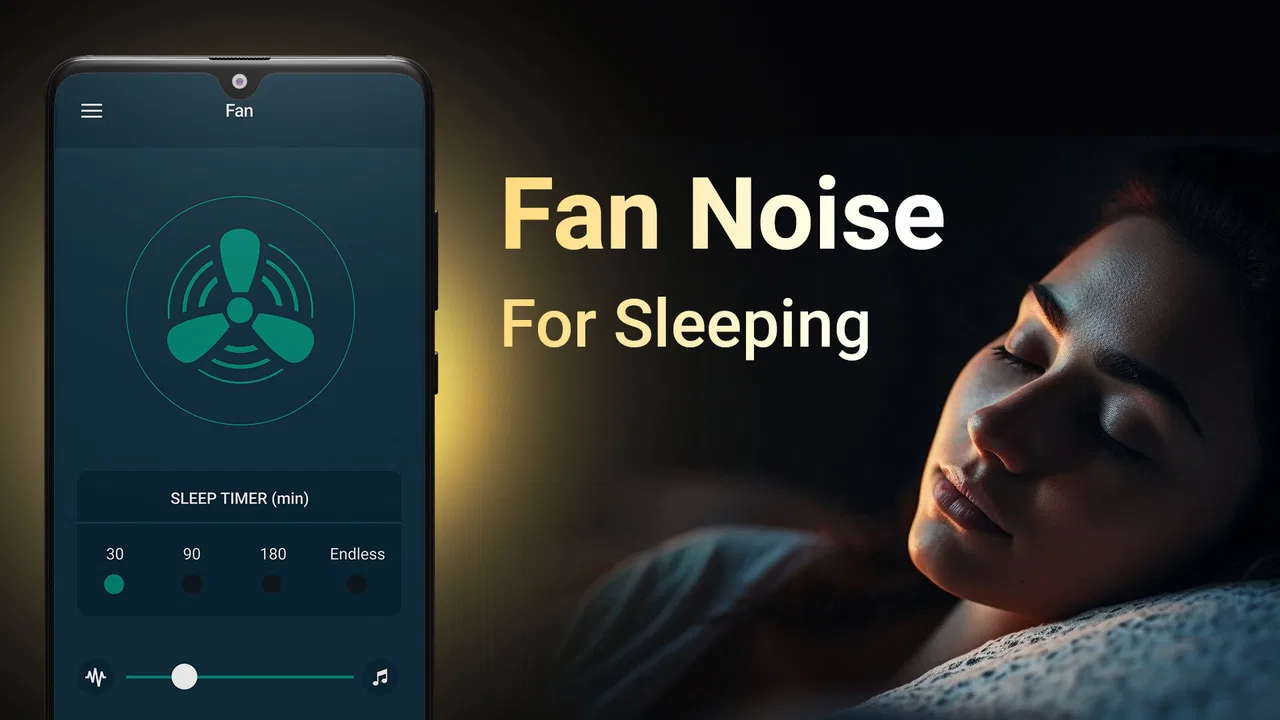
03Can I set a sleep timer or let the fan sound play all night?
The app is intended for flexible listening, so users should check the available timer controls before starting a session. If a sleep timer is included, you can choose how long the sound plays and avoid leaving audio running unnecessarily. If no timer is available in your version, the sound may continue until you stop it manually or close the application.
04Can I use Fan Noise for Sleeping while playing music or using another app?
The app may support background playback, allowing the fan sound to continue while your screen is locked or while you use another application. Actual behavior can depend on your Android or iOS version, battery settings, and whether another app takes control of the audio output. Test it with your preferred music, meditation, or sleep application before using it at bedtime.
05Is Fan Noise for Sleeping safe for children and suitable for everyone?
The app itself generally provides harmless ambient audio, but listening volume is important. Keep the sound comfortably low, especially for babies, children, and people who use headphones for long periods. It should not be treated as a medical treatment for insomnia or other sleep conditions. Anyone with persistent sleep problems should speak with a qualified healthcare professional rather than relying only on background noise.
Pros
- Simple interface makes it quick to start soothing fan sounds.
- Offers steady background noise that can mask household or street sounds.
- Useful timer options help avoid running audio throughout the night.
- Low-effort sleep aid with no complicated setup or learning curve.
- Suitable for naps
- relaxation
- meditation
- or creating a calmer environment.
Cons
- Sound variety may feel limited for users wanting more customization.
- Continuous playback can drain battery during long overnight sessions.
- Some features or sounds may require in-app purchases or contain ads.
- The repetitive audio may not suit people who prefer natural sleep sounds.
- Background playback behavior can vary depending on device settings.

Fan Noise for Sleeping - App
Gallery